
Booking-in: ask the questions your shop actually asks.
Set booking-in up to match your counter, with the device, fault, passcode, condition, photos, signature and any questions of your own. Staff follow the same flow at the counter and on the iPhone app, and customers booking online get asked too.
14 days free · No card needed

Build it your way
every kind of question, in the order you ask them.
Every flow starts with the customer, the device and the fault. Drag in the rest of what your shop needs and add your own questions next to the built-in ones. They can be yes or no, multiple choice, a checklist, a number or free text.
- Up to 12 steps per flow
- Make any question required or optional
- Add a note to staff, like “Remind them to back up”
Only when it matters
questions that only come up when they apply.
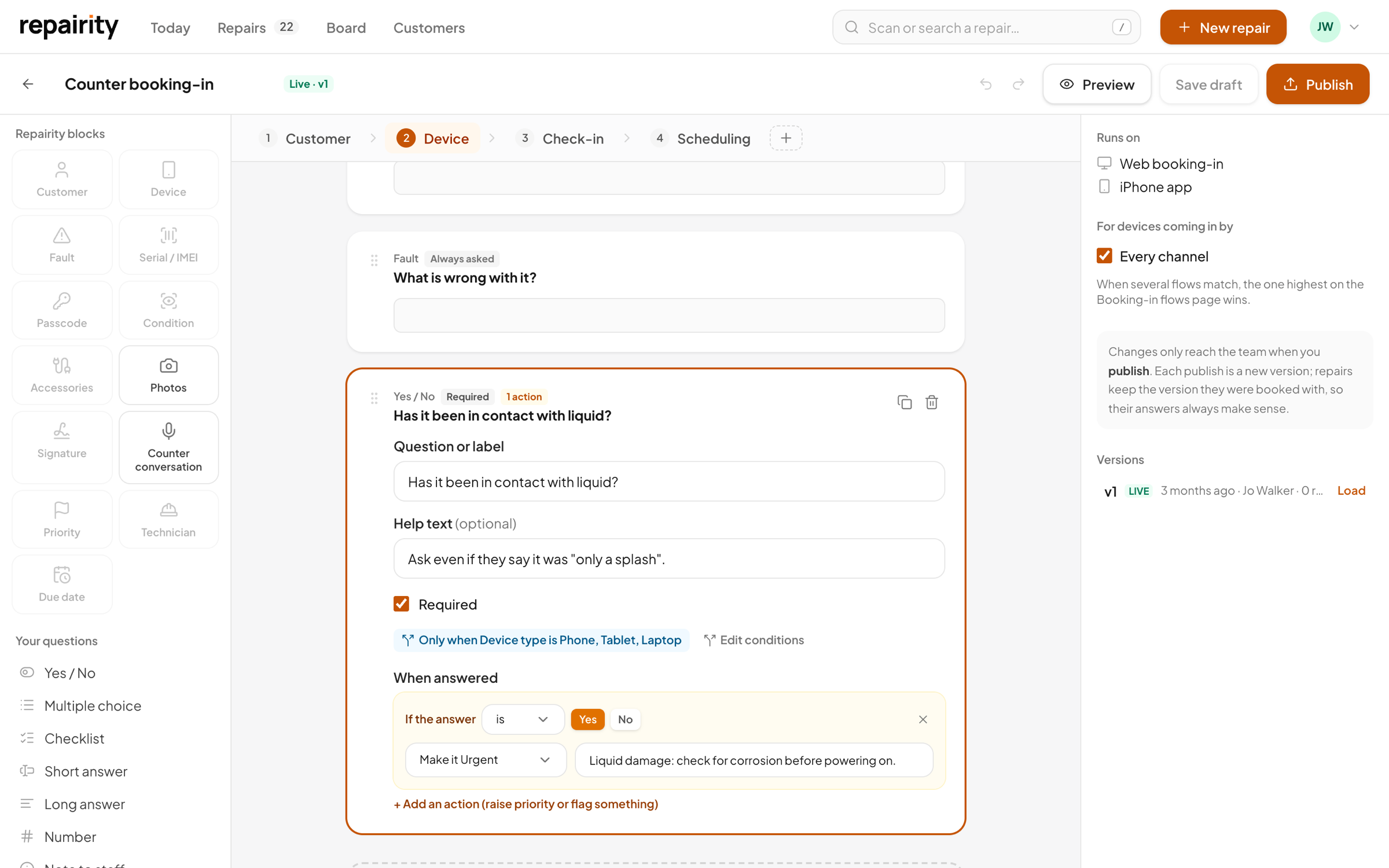
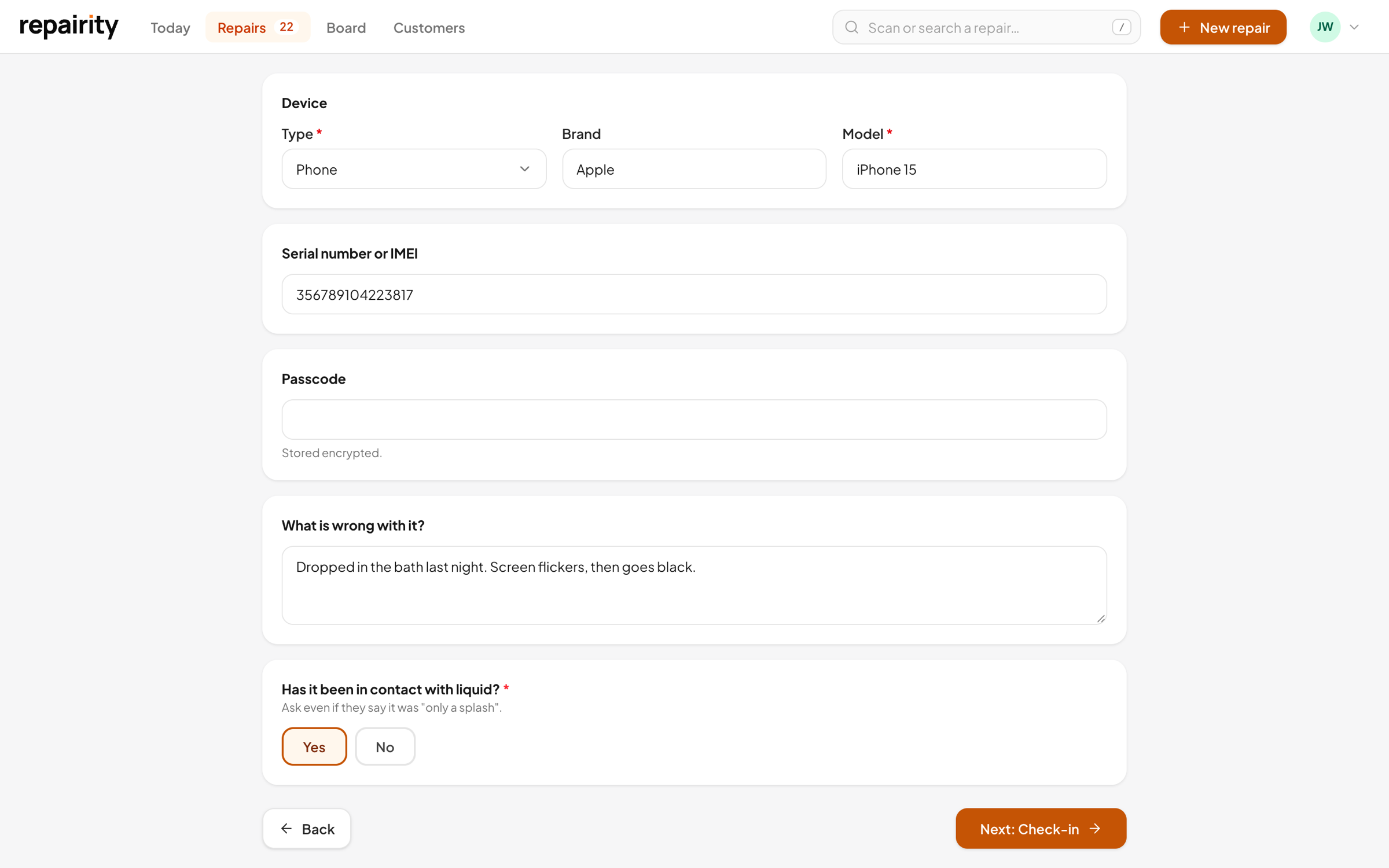
Someone in for a battery swap doesn't need asking about water damage. Set conditions so a question only appears when it's relevant, and add rules so a Yes to liquid damage marks the job urgent and leaves a note for the bench.
- Show a step or question based on an earlier answer
- Or on the device type, or how the repair is coming in
- Answers can set the priority and add a note for the technician
One flow, everywhere
the same questions wherever a repair is booked in.
Staff book in on the web or the iPhone app, whichever is nearer, and they're asked the same things either way. Customers who book online answer your questions before they post the device or drop it off, so you're not ringing them for missing details when it arrives.
- Staff flows run on the web and the iPhone app
- Different flows for different kinds of repair
- Your online booking form adds your questions for customers

Change it safely
change it in a draft and publish when you're happy.
You can rework the flow in the middle of a working day without disrupting the counter. Nothing changes for staff until you publish, and jobs already booked in keep the answers they were given, so last month's repairs don't shift underneath you.
- A live preview shows exactly what staff will see
- Bookings use the published version
- Every repair keeps the answers it was booked in with
Built in
the awkward bits are already built in.
Condition on arrival
Grade the screen, back, frame and the rest as it's handed over, so a scratch can't turn into a dispute at collection.
Customer signature
The customer signs on screen as they hand it over, and your terms are printed on the job sheet.
Counter conversation
Record what the customer tells you at the counter on the iPhone app, and it stays with the repair.
Technician & due date
Pick the technician and due date as you book it in, or let it fall back to your usual turnaround.
good to know.
If you're still weighing it up, try everything free for 14 days. You don't need a card.
Do I have to build a flow before I can book anything in?
No. Repairity comes with a ready-made booking-in flow, so you can book your first repair in straight away and change it later.
Can phones and laptops have different questions?
Yes. Make as many flows as you need, say one for phones, one for laptops and one for repairs that are posted in. Each booking uses the first published flow that matches.
Can customers fill in the questions when they book online?
Yes. Your online booking form asks your customer-facing questions before they post the device or drop it off.
What can a rule actually do?
It can set the repair's priority and add a note for whoever picks it up, whenever an answer matches.
Can it check if a device has been reported stolen?
Yes, if you connect CheckMEND. It can check every device with a serial or IMEI as it's booked in, looking for stolen, blocklisted, finance and insurance flags and Find My. You pay Recipero for each check directly.