
Integrations: plug in the services you already use.
Connect the services you use for texts, shipping labels, device checks, test reports, accounting, marketplaces and Refurbr. Each one works on its own, so you only turn on what you need. Texts come with every plan. Shipping, accounting and device checks start on Growth, and marketplaces and Refurbr come with Scale. You pay the provider directly, and Repairity adds nothing per text or per label.
14 days free · No card needed

seven kinds to choose from.
You can have one provider at a time for text messages, shipping and accounting. The others can all run side by side.
Text messages
Text customers when a repair is booked, when it moves on and when staff message them.
Shipping labels & tracking
Buy outbound and return labels from the repair, with tracking that updates itself.
Device checks
Check for stolen, blocklisted or financed devices, or look up Apple warranty and Activation Lock.
Diagnostics & erasure
Test results, grades and erasure certificates attach to the matching repair.
Accounting
Record a payment on a repair and the invoice and payment are created for you.
Marketplaces
After-sales cases arrive as repairs, and return tracking goes back automatically.
Refurbishment
Returned stock from your Refurbr workbench arrives as repairs, and each unit is booked in, graded and dispositioned back.
Text messages · Twilio, Vonage, ClickSend
updates by text as well as email.
Connect an SMS provider and choose which updates go by text. Every one starts with your shop's name and links to the customer's repair page, so when they wonder whether it's ready, the answer is already on their phone.
- Texts when a repair is booked, at the steps that email the customer, and for staff messages
- Quote texts include the amount and a link to approve
- When it's posted back, the text includes the carrier and tracking number
- With Twilio, customer replies land on the repair
- Customers with no email can get texts only
Shipping · Sendcloud, ShipStation
buy the label right on the repair.
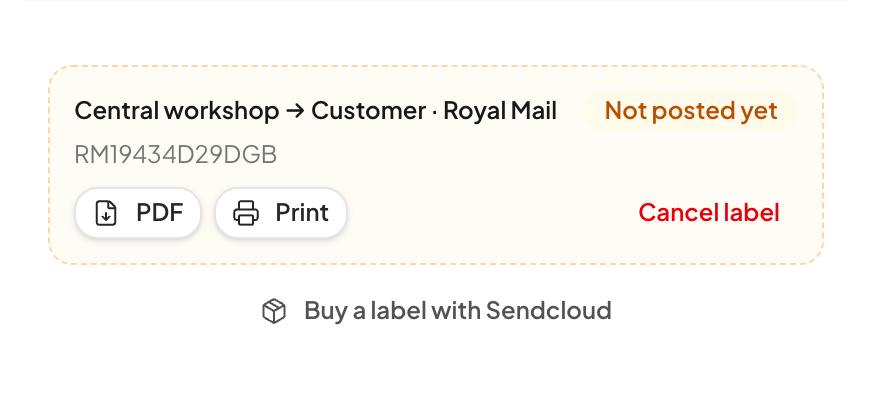
Enter the weight, pick a service from the carriers on your Sendcloud or ShipStation account, and buy. The tracking number is saved on the repair and tracking updates come in on their own. Switch on "Move repairs on from tracking" and the repair moves to in transit when the customer posts it, and to received when it arrives.
- Outbound labels, and free return labels for the customer
- Choose the carrier and service and see the price before you buy
- Print to your label printer through Repairity Print
- Email or text the return label with packing steps
- Cancel a label you didn't use
Checks & reports · CheckMEND, Apple GSX, Phonecheck, Blancco
know what you're holding.
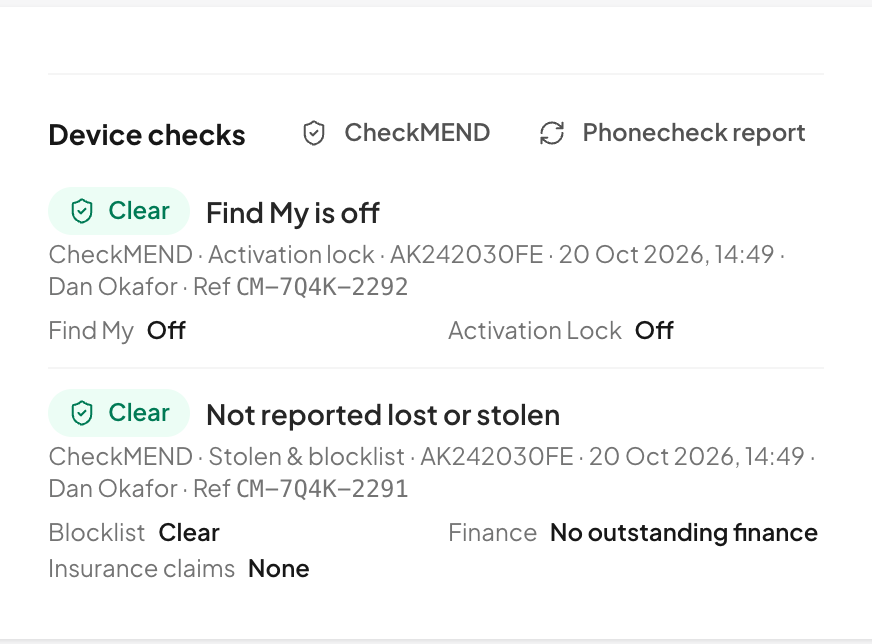
Run a check from the repair and the result sits under the fault, with a clear pill (Clear, Caution or Flagged) and a note on the timeline. If you already test or erase devices with Phonecheck or Blancco, their reports turn up on the right repair by themselves.
- CheckMEND: stolen, lost, blocklisted, finance and insurance flags, plus Find My
- Optionally check every device as it's booked in
- Apple GSX: warranty, coverage and Activation Lock, for Apple service partners
- Phonecheck and Blancco reports attach to the matching repair by IMEI or serial
Accounting · Xero, QuickBooks Online
record the payment and the invoice is done for you.
When someone records a payment on a repair, Repairity creates or updates the invoice in Xero or QuickBooks Online and adds the payment, so nobody types the same repair in again at the end of the month.
- The invoice is created with the repair's parts and labour
- The payment is added too, if you choose the accounts
- Warranty repairs go through at £0
- Connects with one click, without copying any keys
Marketplaces · Back Market, refurbed
marketplace cases arrive as repairs.
Connect your marketplace account and every new case turns up on your list as a repair, with a note of where it came from. When you post the device back, the tracking number goes to the marketplace without anyone copying it across.
- Back Market after-sales cases become postal repairs, waiting for the device
- Back Market BackShip labels and tracking come in with them
- refurbed warranty tickets become repairs too
- Return tracking is sent back to the marketplace when it ships
Refurbishment · Refurbr
fix and grade your refurbr returns here.
Connect your own Refurbr instance and the units your returns team sends for repair turn up as repairs. Refurbr hears back when each one arrives and how it ended, so your stock is right without anyone keying it in twice. Signed Refurbr webhooks keep it up to date between checks.
- Units waiting on your Refurbr Returns Workbench become repairs, with asset tag, serial, SKU, fault and RMA
- Choose which queues: on their way back, waiting to be graded, or marked for repair
- Marking a repair Received books the unit in on Refurbr
- When it's done, it's graded and dispositioned with your own grades, and the diagnosis as notes
- Look any device up to see its asset, location and returns history
- 1A return is approved in Refurbr
- 2The unit arrives in Repairity as a repair
- 3It's booked in on Refurbr when it gets to you
- 4Fixed, graded and dispositioned back in Refurbr
connected in a couple of minutes.
Everything lives under Settings, Integrations. Only people who can manage settings can switch things on.
- Add your account Paste in the API keys from your provider and we store them encrypted. Xero and QuickBooks only ask you to sign in.
- Save & test We make a harmless test call, so you know it works before any customer is involved.
- Keep an eye on it Each integration shows its recent activity, with buttons to test it or disconnect it.

good to know.
If you're still weighing it up, try everything free for 14 days. You don't need a card.
Do I need my own accounts?
Yes. You connect your own Twilio, Sendcloud, Xero (and so on) account, so you keep your prices, numbers and carrier deals.
Do you charge per text or label?
No. Texts work on every plan; shipping, accounting and device checks need Growth, and marketplaces and Refurbr need Scale. You pay the provider for what you use, for example texts, labels or each CheckMEND check.
Can I use two SMS providers at once?
No. Text messages, shipping and accounting use one provider at a time. Turning one on turns the others off.
Do I have to use any of them?
No, everything works without them. Add the carrier and tracking number by hand, and customers hear from you by email.
What do I need to connect Refurbr?
Your Refurbr address (yourcompany.refurbr.app) and an API token with read and write access for a user who can view and edit returns. For instant updates, add Repairity's webhook address in Refurbr under System, Webhooks.
Can I use Apple GSX?
Yes, if you're an Apple Authorised Service Provider or Independent Repair Provider. You'll need your GSX details and certificate from Apple.